
Redirection practice: send an old link to the correct page
Exercise goal: redirect the example path /old-contact/ to a working /contact/ page. Create the destination first.
On a test site, install and activate a compatible Redirection version using the official link below; check its listed requirements.
Open Tools → Redirection and finish setup. Deliberately choose your logging and visitor-data options.
Create a rule under Redirects. Set Source URL to /old-contact/, not an address on another website.
Set Target URL to /contact/. If WordPress is installed in a subdirectory, use the actual destination path.
Keep Regex disabled for this exercise so the rule matches the specific path.
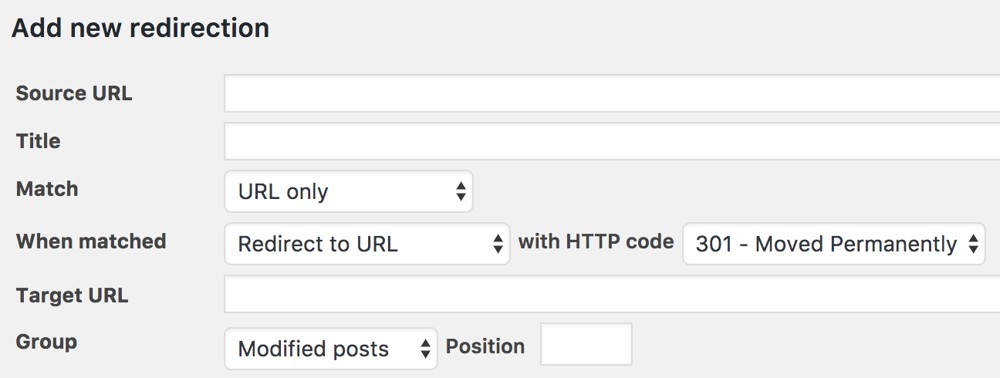
In advanced settings, select Redirect to URL and status 301 for this permanent move, then save the rule.
Open the old path in a private window. The contact page should appear and the browser address should change.
Inspect the first request in the browser Network tool. Expect a 301 response and a Location header pointing to the correct destination.
If you see a loop, inspect the destination and reverse rules. Nothing should redirect /contact/ back to the old path.
Temporarily disable the rule and test again. Clear browser and site caches if the old result persists.
Success check: a direct redirect to a working destination. Avoid sending every 404 to the homepage, and update old internal links too.
Plugin and demo links
- Official Redirection installation and download page
- Official illustrated example and practical guide




0 دیدگاه برای Redirection practice: send an old link to the correct page
اگر تجربه یا پرسشی دارید، همینجا برای ما بنویسید.