
Automatic contents for long posts with Easy Table of Contents
Visitors reading a long guide may only need one particular section.
Easy Table of Contents builds clickable contents from the post headings.
First search for the plugin under Plugins, Add New on a test site and install it.
Open Table of Contents under Settings and enable the desired content type, such as posts.
Create a test post with three actual H2 headings; bold paragraph text is not a heading.
Enable table insertion for that post and preview it.
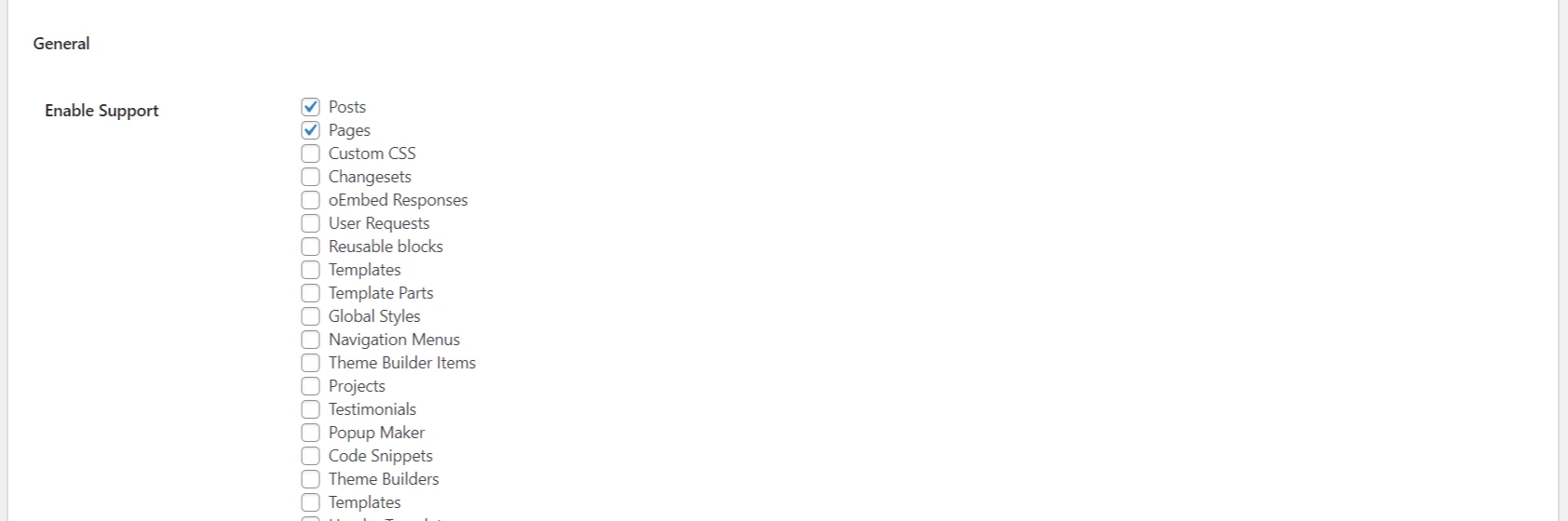
If no table appears, check the minimum heading count and automatic insertion settings.
Click an entry and confirm that it takes you to the correct heading.
Also test the table on a phone to check title length and spacing.
Disable it for short posts; the goal is faster navigation rather than a crowded page.
Plugin and demo links
A public live demo is not available; official screenshots are linked below.



0 دیدگاه برای Automatic contents for long posts with Easy Table of Contents
اگر تجربه یا پرسشی دارید، همینجا برای ما بنویسید.