Find the Cause Before Your WordPress Site Slows Down
Is your WordPress website getting slow, using too many server resources, or leaving you unsure whether the problem is CPU, RAM, database load, or traffic?
WP Server Resource Monitor 8899 is designed to help you monitor your website and server directly from the WordPress dashboard and identify problems before they turn into serious slowdowns or downtime.
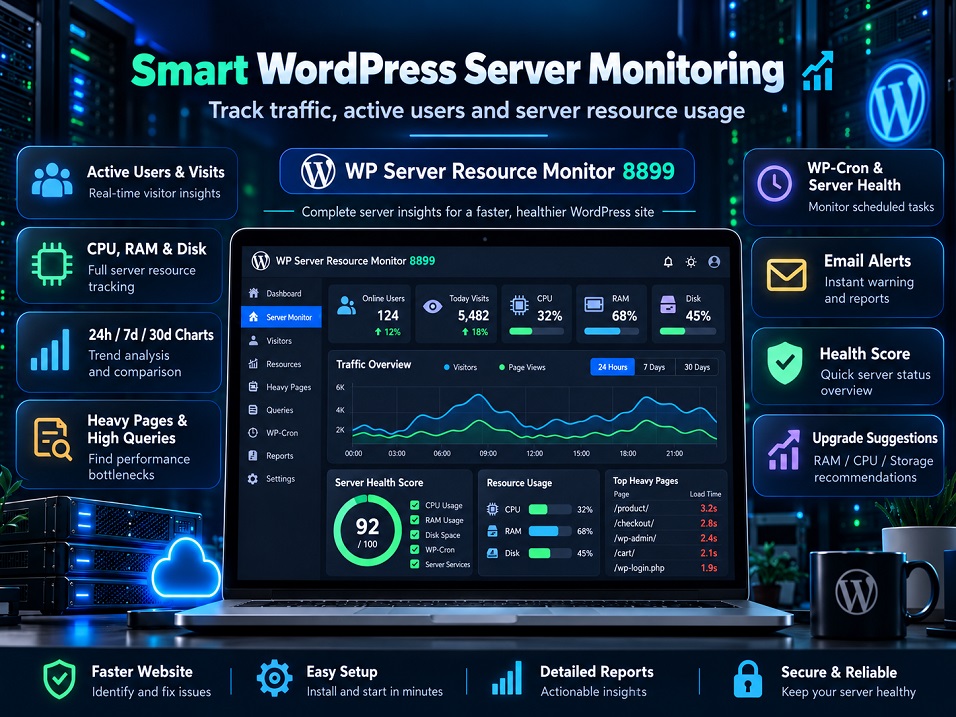
The plugin tracks important metrics such as server resource usage, active users, visits, page response time, database queries, disk space, and WP-Cron status, then presents the information in a clear and easy-to-understand dashboard.
Instead of upgrading your hosting every time the website becomes slow, the plugin helps you understand whether you really need more RAM, a stronger CPU, or additional storage, or whether the real issue is caused by heavy pages, too many queries, scheduled tasks, or WordPress configuration.
Why Is This Plugin Useful?
With detailed 24-hour, 7-day, and 30-day charts, you can identify traffic peaks and see exactly when your server is under the most pressure. This is especially useful for WooCommerce stores, corporate websites, news websites, campaigns, and high-traffic WordPress installations.
The built-in Server Health Score gives you a simple overall rating of your server condition, helping you quickly understand whether your website is healthy, needs attention, or is approaching a critical state.
When resource usage exceeds your defined limits, the plugin can automatically send alerts to the email address you configure using WordPress’s standard email system. You can also receive daily or weekly reports so you can stay informed without constantly logging in to WordPress.
Key Features
- CPU, RAM, server load, PHP memory, and disk space monitoring to help you understand your current hosting resource usage.
- Active user and traffic monitoring with 24-hour, 7-day, and 30-day performance charts.
- Heavy page and high-query detection to help identify performance bottlenecks.
- WP-Cron and slow database query monitoring for better WordPress performance diagnostics.
- Server Health Score and smart upgrade suggestions for RAM, CPU, or storage when additional resources may actually be needed.
- Email alerts and scheduled reports, including high-resource warnings, daily reports, weekly reports, and recovery notifications when the server returns to normal.
- Automatic Persian and English support based on the language configured in WordPress.
Who Is This Plugin For?
WP Server Resource Monitor 8899 is suitable for WooCommerce stores, business websites, news websites, educational platforms, booking websites, high-traffic WordPress sites, and web designers who manage multiple client websites.
Instead of waiting until your website becomes slow or unavailable, use WP Server Resource Monitor 8899 to monitor server conditions, identify resource-heavy areas, and make better decisions based on real performance data.
Monitor your server, detect issues earlier, and only pay for a hosting upgrade when you actually need one.